Amazon listings that sell
Ads bring buyers to your listing. Images, A+ and copy turn them into orders. I do both, for brands on Amazon.com and the European marketplaces: Amazon.co.uk, .de, .fr, .it and .es.
Start with a free listing review, or book a call about your ads.
Get my free review
Gallery, A+ and Brand Story design · amazon.de
Start with a free review
Free, within 2 working days. Yours to keep, whether you order anything or not.
- Free listing review. Send an ASIN. Within 2 working days you get your listing read the way a buyer reads it, and the 3 fixes I’d make first. Yours to keep.
- A proposal with a price. If you want me to do the work, you get a written scope and a price: per ASIN for images and A+, per project for copy, launches and new marketplaces, per month for ads and ongoing management.
- The work, on a plan you approve. Images start with a written scenario, copy with keyword research, ads with a review of your account. Nothing is built or changed until you say yes.
What the free review covers
- 1YesMain: flat on white
- 2YesUpright, front
- 3PartlyTop view
- 4PartlyEdge-on
- 5PartlyDimensions
- ?NoIn use
- ?NoWood & finish
- ?NoCare
From my review of an acacia cutting board on amazon.com: 5 images, 3 missing slides.
- The question a buyer asks at each image, what the image shows, and a verdict: Yes, Partly or No.
- Your review themes from Amazon’s review summary, with the counts, when the listing has one.
- 3 competitors from the same search, and what they show that you don’t.
- Where your title and bullets promise something no image shows, or disagree with your specs.
- What isn’t an image problem, so you don’t pay to fix the wrong thing.
- The 3 fixes I’d make first.
More than an image check. “What isn’t an image problem” points to the real fix: copy that contradicts itself, listing data that doesn’t match, or the product itself. That’s where my copy, launch and management work starts.
Running ads? Ads can’t be judged from a public page, so book a 30-minute call instead: you don’t need a gallery review first.
No ASIN yet? Send the competitor listing you most want to beat.
Listing images & A+
A gallery, A+ and Brand Store that answer the questions your buyers ask, built around your real product.
- the dish-rack plan
- Norbitt (gallery, English and German)
- frient (gallery)
- ESSENTIAL FOODS (gallery, A+ and Brand Story)
- uyuni (Brand Store)
Who it’s for
- Listings that get clicks but not enough orders.
- New products with a folder of brand photos and no gallery yet, like my Norbitt launch kit.
- A+ that repeats the gallery instead of adding to it, like the ESSENTIAL FOODS listings before my redesign.
What’s included
Pick what you need.
- Gallery: the main image on pure white, as Amazon’s image rules require, and the slides after it, one buyer question per image.
- A+ Content and Premium A+: what the gallery can’t hold, such as comparison tables, guides and Q&A. Premium A+ where your brand is eligible.
- Brand Story: the carousel that introduces your brand and leads to your other products.
- Brand Store: home and category pages, banners and mobile versions, in your brand’s own look.
- Each marketplace in its language: German text on my amazon.de work, and French, Italian, Spanish and UK versions for those marketplaces.
How I work
- The brief. A written scenario for every image: the buyer’s question, what the image shows and the exact text on it. Numbers I can’t see on your public page stay in [brackets] until you confirm them.
- Wireframes. 1–2 wireframes of the key images, for your approval.
- Your go-ahead. I build the images only after you approve the scenario.
- Images. Your real product, from your own photos or renders, never redrawn. Text is typeset, and every number is checked against your listing. Where AI builds a scene around your product, a code check confirms the product’s pixels are unchanged.
- Files. One ZIP per ASIN, ready to upload. You upload them yourself.
What you receive
One ZIP file per ASIN:
- The final images, PNG, full resolution
- The approved English brief
- Alt texts for every image
- An upload map: which file goes into which slot
- A file list with checksums, proof the files weren’t changed
- A one-page QC report
You upload the files to Seller Central; the upload map shows where each one goes.
What I need from you
- Photos or renders from 2000 px: all angles and a close-up of each part.
- For a product you assemble: large photos of each part, and the manual.
- The specs I can’t see on your public page.
- Brand kit: vector logo, colors, and the font with its license.
If I’m missing a shot I need, you get a short reshoot brief.
What images can’t fix (and I’ll tell you)
- Listing data. Product Dimensions that don’t match the images are fixed in the listing attributes; the images use the numbers you confirm.
- The product itself. An image shows the real thing honestly. It can’t change it.
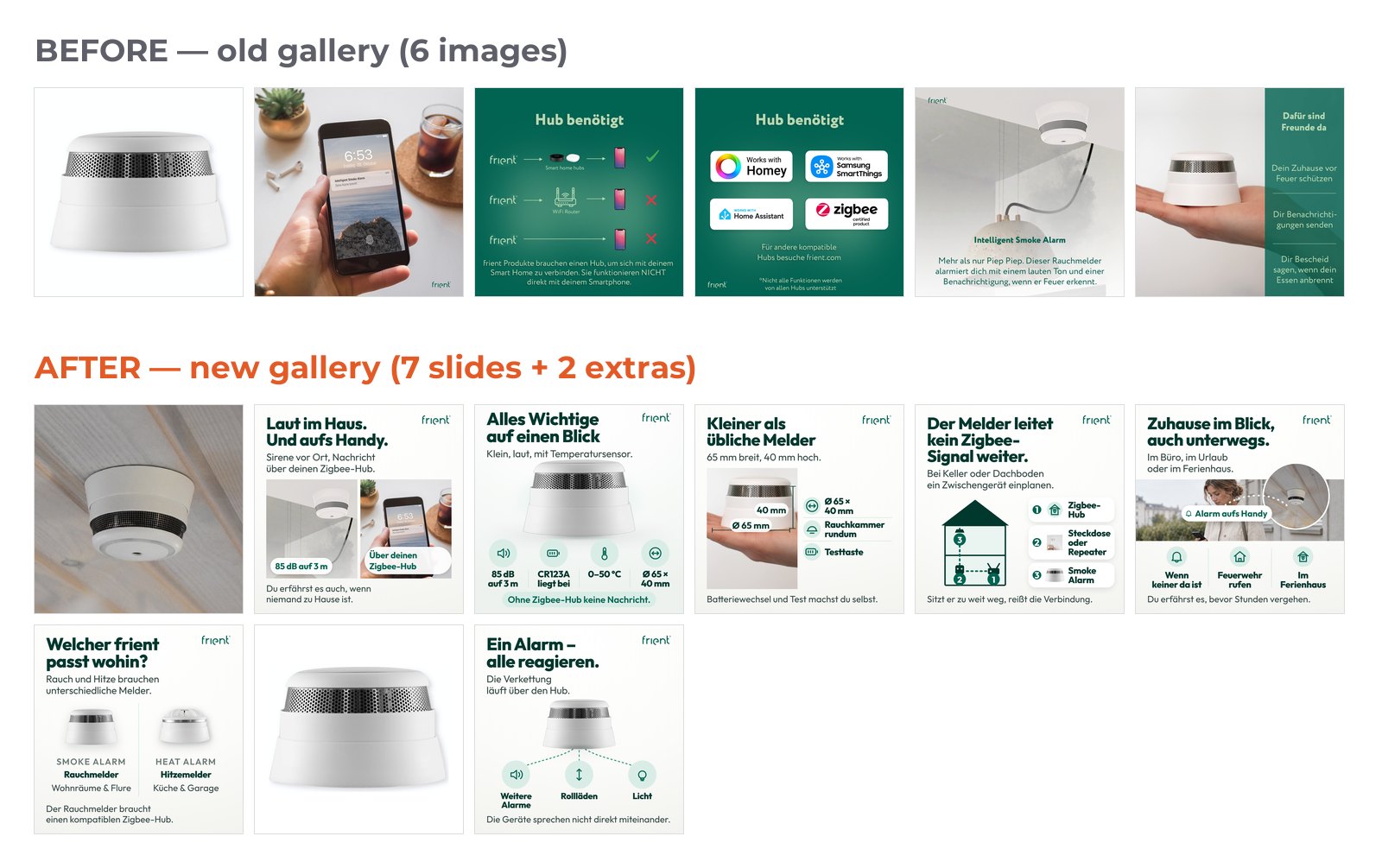
Gallery · amazon.de
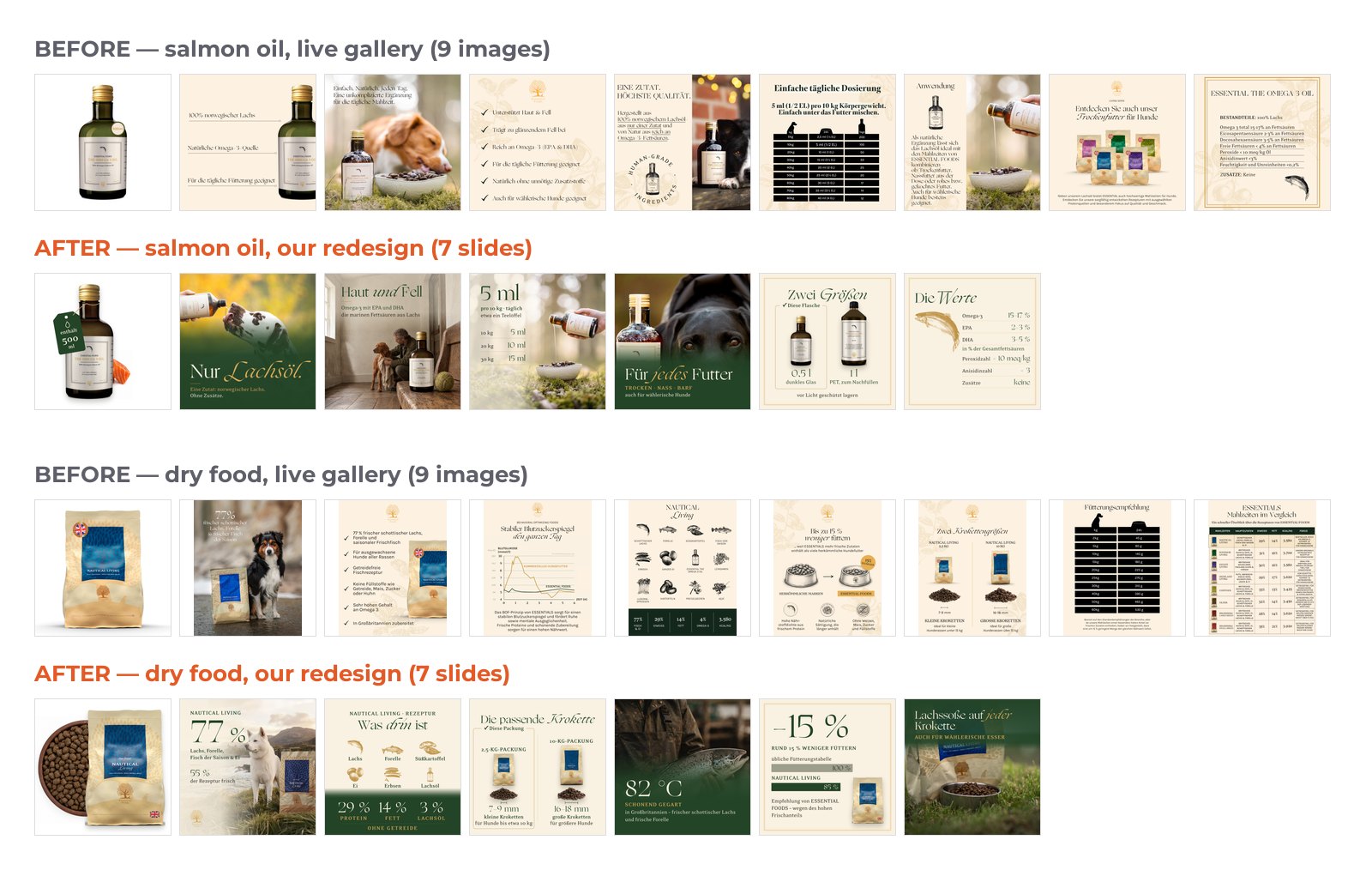
Gallery, A+ and Brand Story design · amazon.de
Price
Per ASIN, for a gallery or a gallery + A+. Quoted after the free review; the price is fixed before work starts, with the scope and dates in writing.
I test on my own listings first
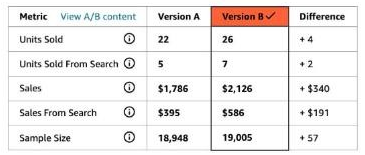
Amazon A/B test · 10 Mar – 4 May 2026 · my own listing
In Amazon’s own split test on my own listing, the new gallery outsold the old one: 26 units to 22, on the same traffic, over 8 weeks.
Amazon’s estimate: a 57% probability that the new gallery is better. That’s weak evidence, so I read it as a direction, not a promise.
Listing copy & keyword research
Titles, bullets and backend terms built on what your buyers search for, written for each marketplace in its own language.
Who it’s for
- A new ASIN that needs its first listing.
- A listing whose copy disagrees with its images or specs, like the cutting board below.
- A listing going to a new marketplace: German, French, Italian, Spanish or UK English, researched for local search terms, not translated word for word. UK buyers search for a torch, not a flashlight.
Proof
- The Norbitt launch kit includes US listing copy: titles for the parent and six colours, Item Highlights, five bullets, description and backend terms. Every number on the US slides matches it, checked by script.
- I wrote the German listing copy for four ESSENTIAL FOODS products for amazon.de, with the same numbers as the gallery I designed.
- In my redesign of uyuni’s German Brand Store, every page name matches what’s on it: “Kegelkerzen”, which opened on tapers, became “Stabkerzen”.
- Bullet 5
- “We Recommend do not wash”
- Specs
- “Hand Wash Only”
Listing review · amazon.com
What’s included
- Keyword research for your product on that marketplace: the terms buyers type, from Amazon search and your top competitors, plus your search term and Brand Analytics reports if you share them.
- The full listing: title, Item Highlights, bullet points, description and backend search terms, for the parent and every variation.
- Checked before you get it: against Amazon’s listing rules, and every number against your images and specs.
How I work
- Keyword research, and the terms each part of the listing targets.
- A draft for your review. Numbers I can’t see on your public page stay in [brackets] until you confirm them.
- Your edits, then the final copy.
- You paste it into Seller Central or upload it by flat file. Your login stays yours.
What you get
One document per ASIN and marketplace: the final copy, the keyword list, and the terms each section targets.
Price
Per project, per ASIN and marketplace. Quoted after the free review, fixed before work starts.
Get my free reviewAmazon Ads
Sponsored Products, Sponsored Brands and Sponsored Display, set up or restructured. Then a routine: bids, placements and negatives every week; keyword harvesting, Brands and Display checks and a structure review every month.
Who it’s for
- A new ASIN or a new marketplace that needs its first campaigns.
- Accounts where spend grows faster than sales, and nobody can say which campaigns pay for themselves.
- Brands that would rather not run the weekly routine themselves.
Proof
I run Sponsored Products for my own brand in the US and Germany every week.
- ACoS 47.6% → 35.7%, ad sales +56%. My brand on amazon.com, the same season a year apart (1 Sep–23 Oct 2025 vs 23 Sep–23 Oct 2026, per 30 days).
- One campaign, 2.5× the sales. A keyword campaign went from $1,437 to $3,585 in monthly ad sales while its ACoS fell from 34.5% to 21.3%.
- $150,000+ of my own money. Spent on Sponsored Products on amazon.com since 2022, so I read your search term report the way I read mine.
Your campaigns get the same routine.
What’s included
| Structure | A match-type funnel. Auto and broad campaigns find search terms; phrase and exact campaigns scale the ones that sell. Budgets and campaign names you can read at a glance. |
|---|---|
| Every week | Bids on keywords and product targets, placement adjustments (top of search, rest of search, product pages), and negatives for search terms that spend without selling. |
| Every month | Converting search terms promoted into phrase and exact, competitor ASINs that waste spend excluded, Sponsored Brands and Display checked, the structure reviewed. |
Auto & broad find the search terms
Phrase & exact scale the ones that sell
Negatives stop the ones that spend without selling
How I work
- Your listing first. Ads send buyers to your page, so I start with the free review: it shows what a buyer finds when an ad brings them there.
- Account review. You add me as a user in Seller Central or the Amazon Ads console, with the permissions you choose. Your password stays yours. I read your search term, placement and campaign reports.
- Plan and setup. Which campaigns to keep, merge, pause or create, and the budgets. Nothing changes until you approve the plan.
- Weekly optimization, made through bulk files, each with a change log: what changed and why.
- Monthly report: spend, sales, ACoS and TACoS against last month, what I changed, and next month’s plan.
What you get
A campaign structure you can read, a weekly change log, and a monthly report with a plan.
Price
Setup or restructuring per project; weekly optimization per month. Quoted after a call and the account review, fixed before work starts.
Launch & European expansion
A new product launched with everything ready on day one, or a listing that sells taken to Amazon.de, .fr, .it, .es and .co.uk.
Who it’s for
- Brands launching a new ASIN on Amazon.com or in Europe.
- Brands that sell on one marketplace and want the next: from the US into Europe, or from Germany to France, Italy, Spain and the UK.
- New sellers who need help setting up and verifying a seller account.
Proof
- My Norbitt launch kit for amazon.com and amazon.de: from 159 brand files, an 8-slot gallery, Brand Story and Brand Store in English and German, plus US listing copy.
- My frient and ESSENTIAL FOODS galleries for amazon.de, with German text on the slides.
- I sell my own brand on Amazon in the US, the UK, Germany, France, Italy, Spain, Ireland, Sweden and Belgium, and run its listings and A/B tests myself.

Launch kit · amazon.com and amazon.de
What’s included
- Launch plan for a new ASIN: keywords, listing copy, gallery and A+, launch campaigns, and what to watch in the first weeks.
- A localized listing for each marketplace: keyword research in the local language, the copy, and images with their text in that language.
- Marketplace setup: adding the marketplace in Seller Central, creating your offers there with Amazon’s Build International Listings tool or by flat file, and a checklist of what the country asks of you before you sell, such as VAT, packaging registration and product safety details, for you and your tax adviser.
- Account setup: for new sellers, help through Amazon’s registration and identity verification.
How I work
- A free review of the listing you want to launch or take abroad. No ASIN yet? Send the competitor listing you most want to beat.
- A plan with a price: which marketplaces, which ASINs, what gets localized, in what order.
- Build: keywords, copy, images and A+ for each marketplace, and the launch campaigns.
- Launch, then weekly ad optimization through the first weeks, and ongoing management after that if you want it.
What you get
For each marketplace, a listing ready to upload (copy, images, A+), launch campaigns, and the requirements checklist.
Price
Per project. Quoted after the free review, fixed before work starts.
Ongoing management
After the first project, I keep your ads and listings working: every week, with a report and a plan every month.
Who it’s for
- Brands that finished a first project with me and want it kept up.
- Brands without an Amazon manager in house.
Proof
The weekly routine is the one I run on my own brand in the US and Germany.
What’s included, every month
- Ads: the weekly and monthly routine from Amazon Ads above.
- Listings: copy, images and A+ updated when reviews, search terms or competitors give a reason.
- A monthly review: what worked, what didn’t and what to change next, by listing and by campaign.
- A monthly report and next month’s plan, in writing, and a call if you want one.
How it starts
After a first project (images, copy, an ads setup or a launch), so we both know the account. A monthly fee, quoted after that project and fixed before the month starts.
Get my free reviewQuestions
What if my problem isn’t the images?
Then the review says so, and I won’t sell you images for it. Every listing review has a section called “What isn’t an image problem”. In the cutting board’s, the cracks point to the wood, not the gallery. In the dish rack’s, Product Dimensions that don’t match the image are listing data, so you fix them in the listing, not with a new image. If the fix is your copy, your ads or a new marketplace, that’s work I do too. If it’s the product, I say so.
Will new images increase my sales?
On my own listing, Amazon’s split test put the new gallery ahead: 26 units to 22, on the same traffic. Amazon rates that as weak evidence (57%), and your result depends on your listing, so I don’t promise a number. If your listing qualifies for Manage Your Experiments (Brand Registry and enough traffic), you can test my images against your current ones the same way and read the result in your own Seller Central.
Who’s behind HelixBoost?
Me: an Amazon seller since 2016, not an agency. I sell my own private-label brand in the US, the UK and across the EU, and run its ads, listings and images myself. HelixBoost is operated by OTUSWORLD Ltd, a UK company.
How much does it cost?
I quote after the free review, once I’ve seen the listing: per ASIN for images and A+; per project for listing copy, launches and new marketplaces; per month for ads and ongoing management, after a call and the account review. The review costs nothing, so you see what needs fixing before you spend anything. Want a price with your review? Open “Add a note” in the form and say which service and which ASINs.
Do you need access to my account?
Not for the review, images or copy: I work from your public listing page, and you upload the files yourself. For ads and ongoing management, yes: you add me as a user in Seller Central or the Amazon Ads console, with the permissions you choose. Your password stays yours.
Which marketplaces do you work on?
Amazon.com and the European marketplaces: Amazon.co.uk, .de, .fr, .it and .es. I sell my own brand on Amazon in the US, the UK and the EU (DE, FR, IT, ES, IE, SE, BE), four of my cases are amazon.de work with German text on the images, and I deliver listings and images localized for each marketplace.
Can I order just one service?
Yes. You can start with one service for one ASIN: a gallery, a listing, an ads restructure. Ongoing management comes after a first project, once I know the account.
What if I don’t like the images?
You approve the written scenario and 1–2 wireframes of the key images before I build any image, so the direction is settled first.
Is it AI? Will my product look different?
Your product is never redrawn: I place it from your own photos or renders, and text is typeset, not generated. Where AI builds the scene around your product, a code check confirms the product’s pixels are unchanged. In my frient gallery every shot of the alarm is the brand’s own photo; one lifestyle scene around it is AI-generated.
Will you add me to a mailing list?
No. I use your details to answer your request, and I don’t use them for newsletters or marketing.
Start with one listing
Send an ASIN and the marketplace. Free, within 2 working days. About ads, a 30-minute call is the faster start.